eTagger - An Energy Pattern Tagging Tool for GitHub Issues in Android Projects
Tool Description
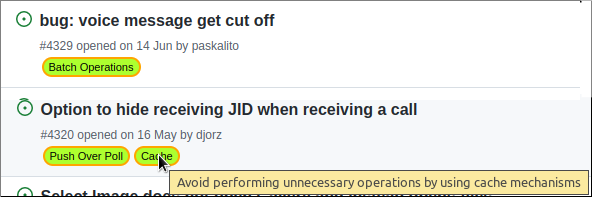
eTagger is a Chrome extension that labels energy sensitive issues from Android projects on GitHub with energy patterns associated with the issue. The goal of eTagger is to make both the developers and the maintainers of the project aware of the energy efficiency when they take up the issues raised in the project, thereby increasing their adoption and making the projects more energy efficient.
Note: The current version of eTagger may have issues on runnning on some architectures of Mac systems.
Download Tool ZipInstallation
Requirements
Have Python 3.x installed in your system.
From Github
Clone or download this github repository:
git clone https://github.com/rishalab/eTagger.git
Running the Flask backend
Navigate into the backend directory:
cd backend
Install the requirements:
pip install -r requirements.txt
Note: The sentence-transformers may not get installed on some architectures of Mac systems. In such cases, kindly install the package manually with conda (requires conda environment installed) using the following command.
conda install -c conda-forge sentence-transformers
To start the server use the following command:
python backend.py
Loading the Chrome extension
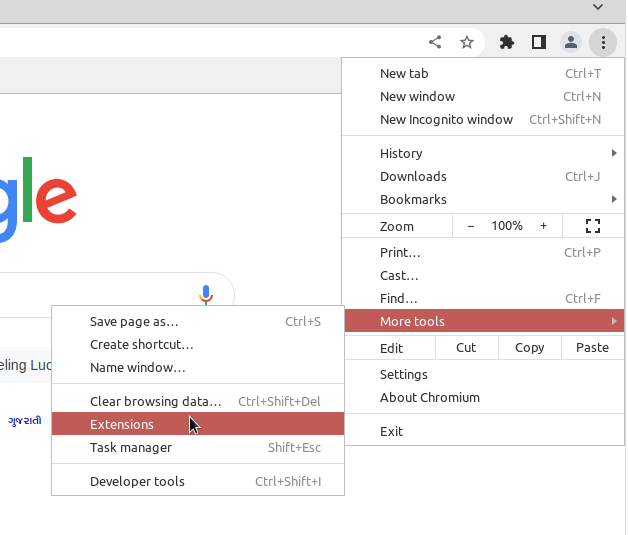
Select the extensions option in control and customize menu in the Chrome browser
Customize and Control > More Tools > Extensions
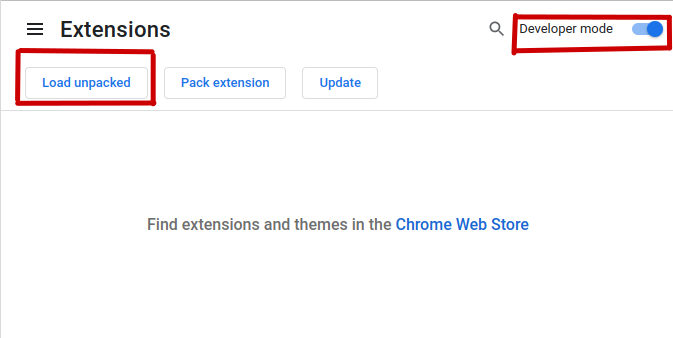
Enable the develper mode, click on load unpacked and select the extension folder
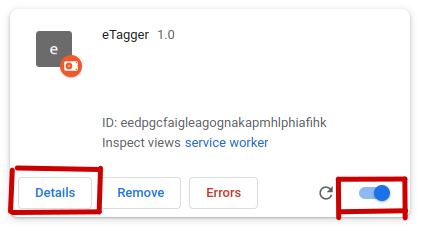
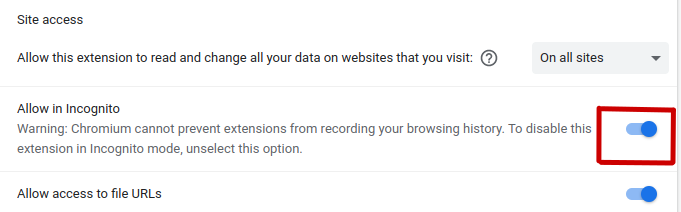
Once the extension is loaded, enable it and allow it to work in incognito:
Details > Allow in incognito
Usage
Navigate to an Android project repository on Github.
Navigate to the Issues tab to see the issues labeled with energy patterns.

Approach diagram
-
Generation of Labels
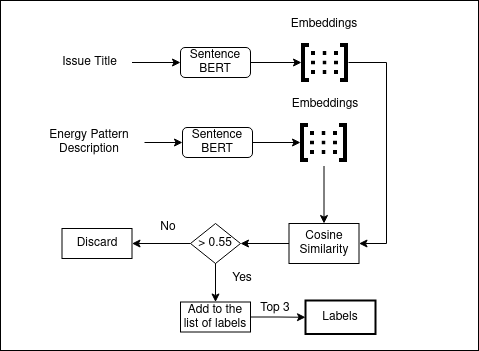
eTagger uses the cosine similarity metric of the issue text and the energy pattern description to find out the labels associated with the issue. For the sake of providing a better UX, the number of labels are capped at 3.
-
Working of Extension
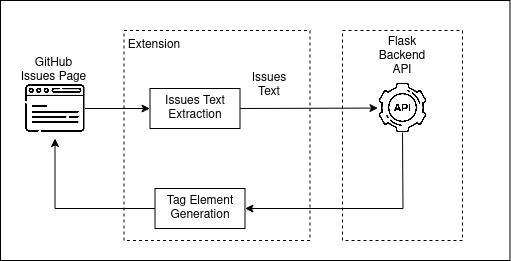
The approach of labeling described in the previous step is deployed on a local server using the Flask web framework. The extension monitors the browser forload of GitHub issues page. Once loaded, the text data from each of the issues is extracted and sent as an input to the flask backend server. The server labels the issues using the labeling approach and returns the list of labels for the given issue. This list is used to generate the tag element for each of the labels. These tags areappended to the issues in the webpage
Screenshots
Goals
- Make the developers aware of energy patterns in their projects.
- Help in driving the Android projects towards energy efficient development.
Results
Demo Video
Contributors
Shriram Shanbhag, Sridhar Chimalakonda, Vibhu Saujanya Sharma, Vikrant Kaulgud